#34833: "Board positioning: avoid requiring scrolling where possible"
Tentang apa laporan ini?
Apa yang terjadi? Pilih di bawah
Apa yang terjadi? Pilih di bawah
Silakan periksa apakah sudah ada laporan tentang hal yang sama
Jika ya, silakan VOTE untuk laporan ini. Laporan dengan suara terbanyak diberikan PRIORITAS!
| # | Status | Votes | Game | Type | Title | Last update |
|---|
Detil Deskripsi
-
• Mohon salin/tempel pesan error yang Anda lihat di layar, jika ada.
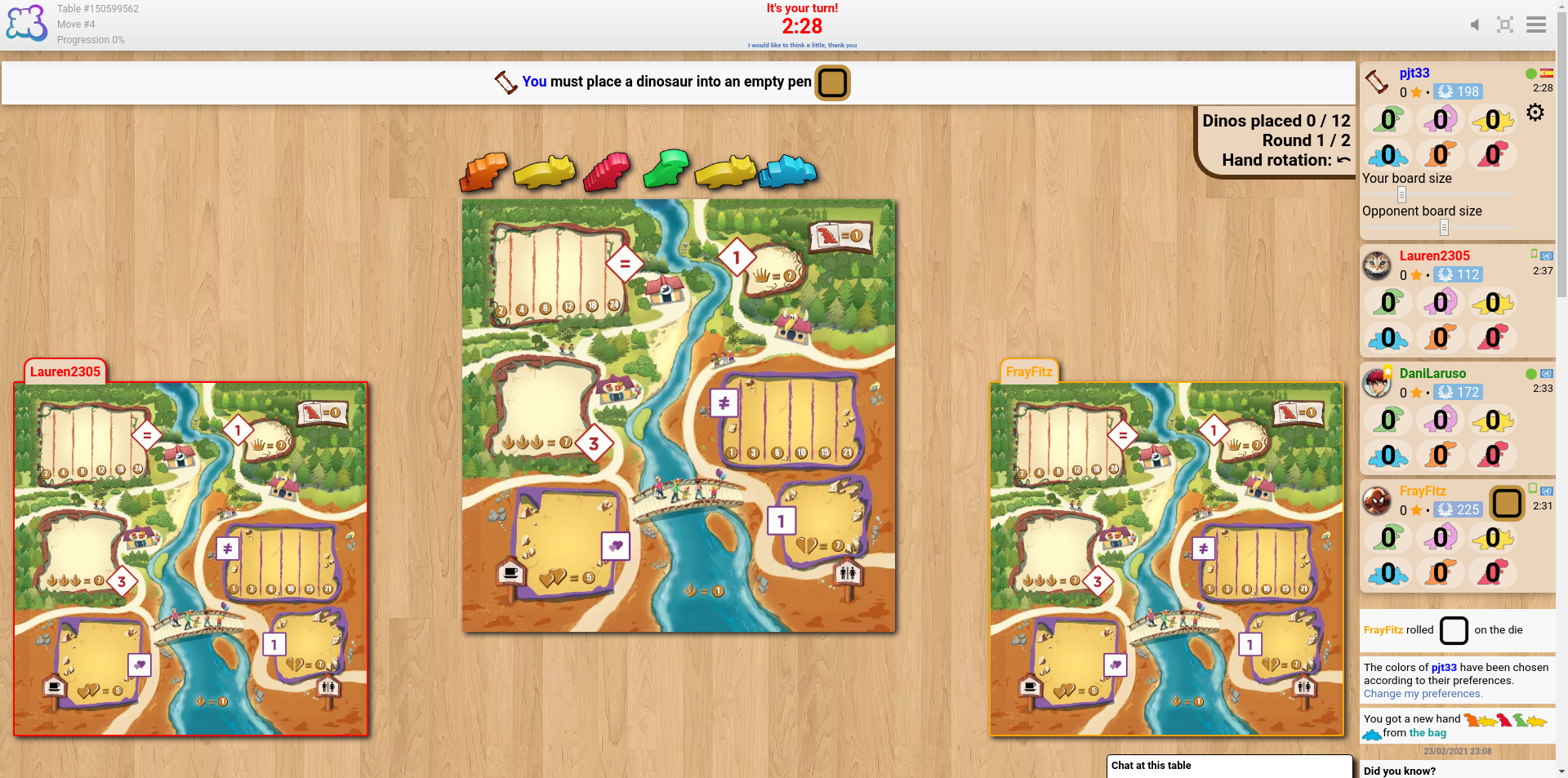
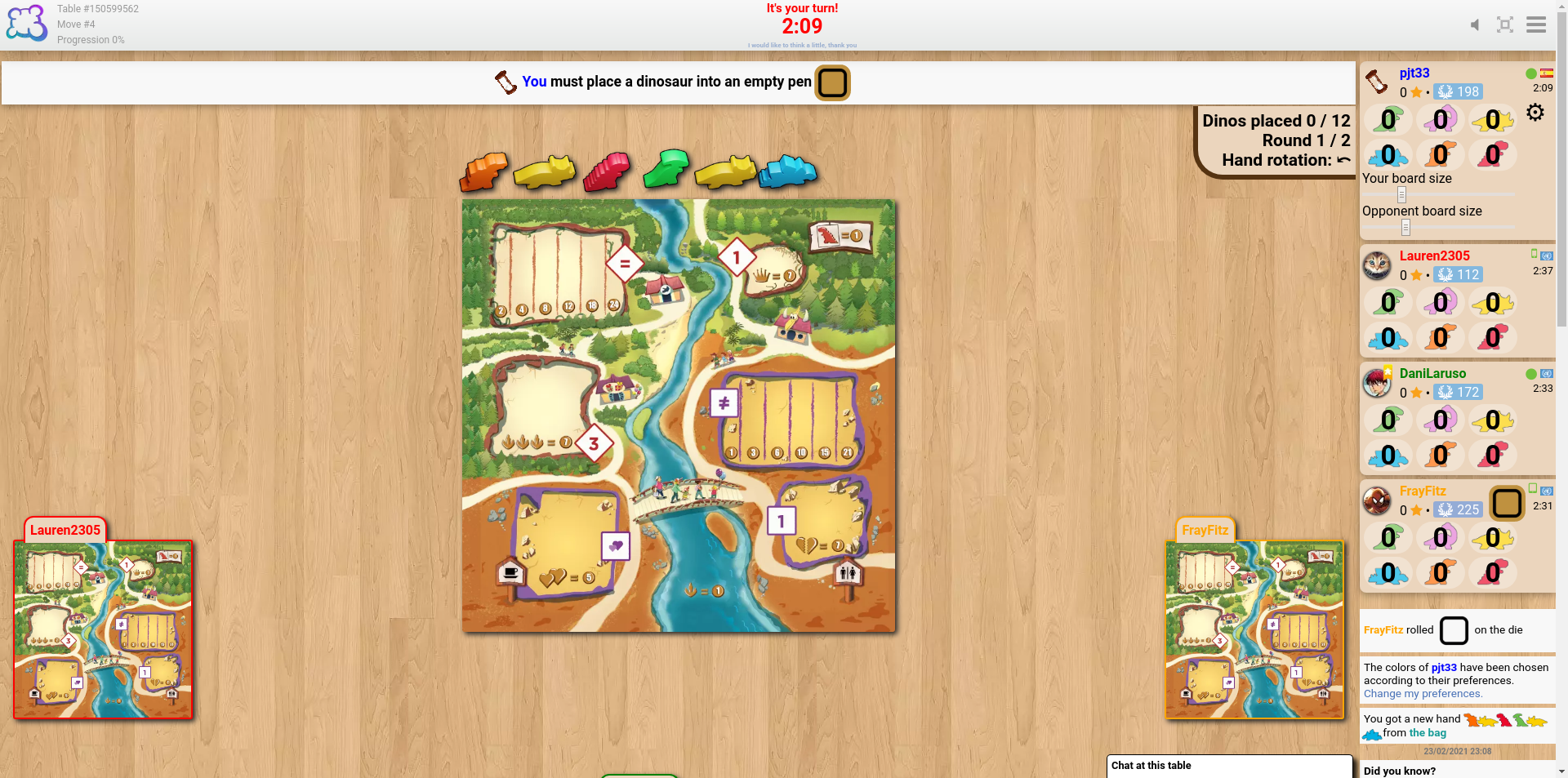
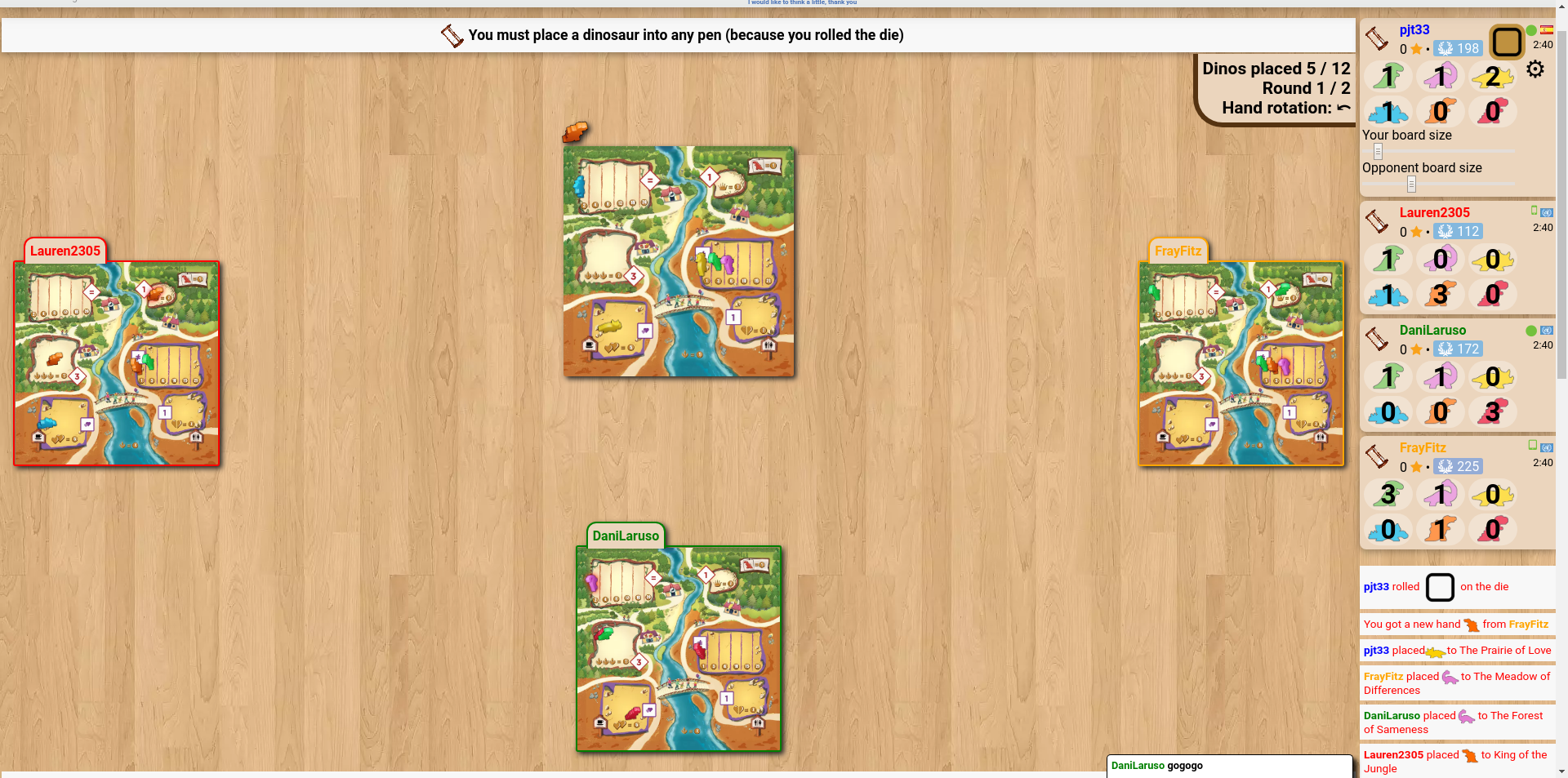
The sliders to change the sizes of the boards seem like a good idea, but my experience of trying to find a suitable size is that the problem isn't the board size but their position. It seems that the boards of the players to my left and right align with the bottom of the screen, and the boards of the fourth (and fifth, if applicable) player(s) go below the bottom of the screen unless using really tiny sizes.
cheddarmonk.org/forumimg/draftosaurus-initial-sizes.png and cheddarmonk.org/forumimg/draftosaurus-aligns-bottom.png show how making the opponent boards smaller pushes them down.
cheddarmonk.org/forumimg/draftosaurus-fixed-margin.png was the best that I could manage to get the boards to fit on screen without scrolling, and even then I had to scroll down a little and lose some of the header. This is with a maximised browser window on a 1920x1080 screen.
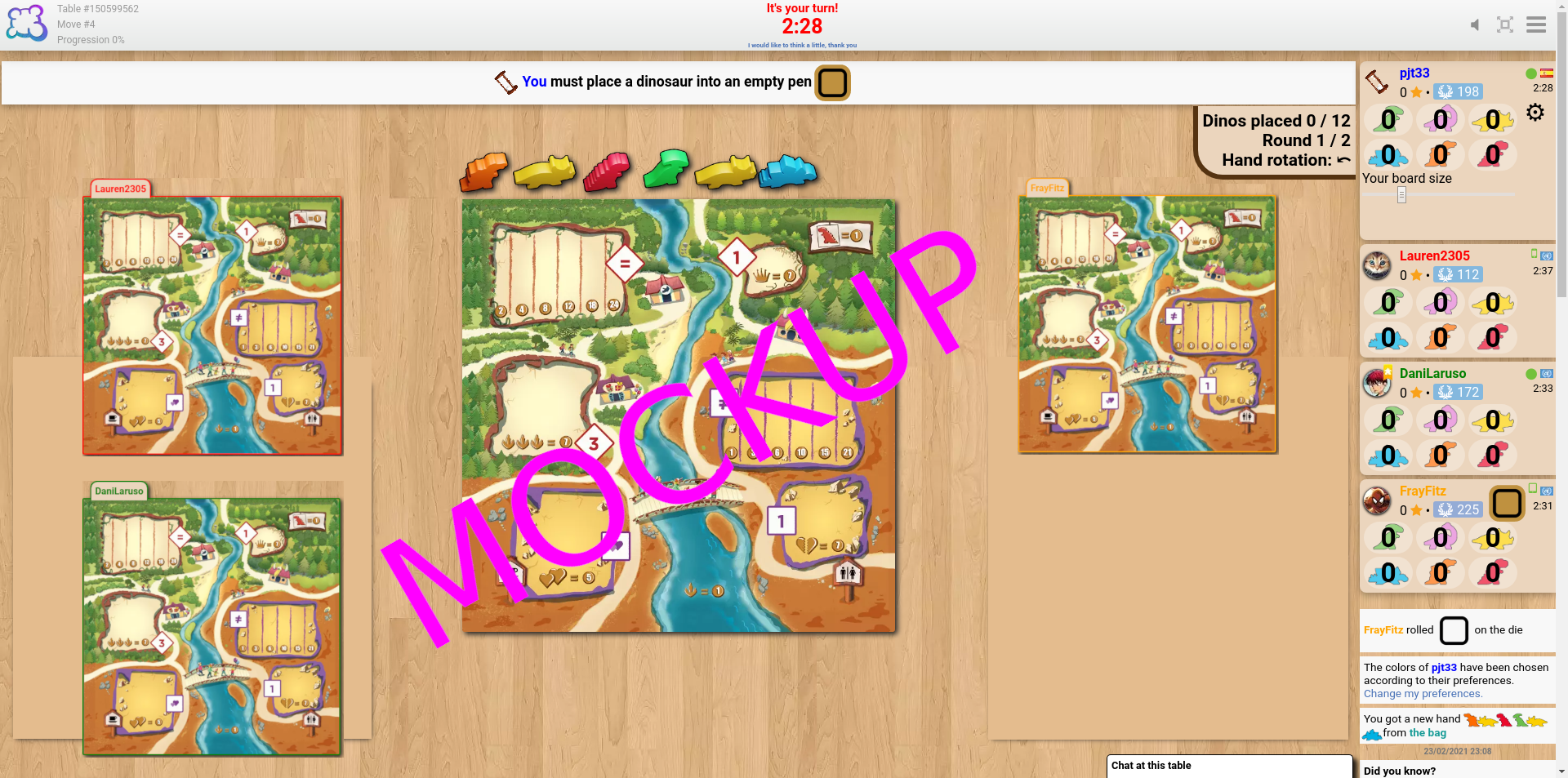
For desktop I think that it would work to have just one slider, for my own board size, and to fit the opponent boards into the left and right margins by calculating the scale factor which lets them both fit vertically, and the scale factor which lets them fit horizontally, and choosing the smaller of the two. I've made a mockup at cheddarmonk.org/forumimg/draftosaurus-mockup.png which shows how much larger the boards can be without scrolling. -
• Mohon jelaskan apa yang ingin Anda lakukan, apa yang kemudian Anda lakukan, dan apa yang terjadi
• Apa browser yang Anda gunakan?
Google Chrome v79
-
• Harap salin/tempel teks yang ditampilkan dalam bahasa Inggris alih-alih bahasa anda. Jika kamu memunyai screenshot dari sebuah kesalahan (praktik bagus) kamu busa menggunakan gambar untuk menandakan pilihan servis anda (snipboard.io for example) untuk mengunggah itu dan salin/tempel tautan disini apakah teks ini tersedia dalam translation system? jika iya, itu bisa diartikan lebih dari 24 jam
The sliders to change the sizes of the boards seem like a good idea, but my experience of trying to find a suitable size is that the problem isn't the board size but their position. It seems that the boards of the players to my left and right align with the bottom of the screen, and the boards of the fourth (and fifth, if applicable) player(s) go below the bottom of the screen unless using really tiny sizes.
cheddarmonk.org/forumimg/draftosaurus-initial-sizes.png and cheddarmonk.org/forumimg/draftosaurus-aligns-bottom.png show how making the opponent boards smaller pushes them down.
cheddarmonk.org/forumimg/draftosaurus-fixed-margin.png was the best that I could manage to get the boards to fit on screen without scrolling, and even then I had to scroll down a little and lose some of the header. This is with a maximised browser window on a 1920x1080 screen.
For desktop I think that it would work to have just one slider, for my own board size, and to fit the opponent boards into the left and right margins by calculating the scale factor which lets them both fit vertically, and the scale factor which lets them fit horizontally, and choosing the smaller of the two. I've made a mockup at cheddarmonk.org/forumimg/draftosaurus-mockup.png which shows how much larger the boards can be without scrolling. • Apa browser yang Anda gunakan?
Google Chrome v79
-
• Tolong jelaskan saran Anda secara tepat dan ringkas sehingga semudah mungkin untuk memahami apa yang Anda maksud.
The sliders to change the sizes of the boards seem like a good idea, but my experience of trying to find a suitable size is that the problem isn't the board size but their position. It seems that the boards of the players to my left and right align with the bottom of the screen, and the boards of the fourth (and fifth, if applicable) player(s) go below the bottom of the screen unless using really tiny sizes.
cheddarmonk.org/forumimg/draftosaurus-initial-sizes.png and cheddarmonk.org/forumimg/draftosaurus-aligns-bottom.png show how making the opponent boards smaller pushes them down.
cheddarmonk.org/forumimg/draftosaurus-fixed-margin.png was the best that I could manage to get the boards to fit on screen without scrolling, and even then I had to scroll down a little and lose some of the header. This is with a maximised browser window on a 1920x1080 screen.
For desktop I think that it would work to have just one slider, for my own board size, and to fit the opponent boards into the left and right margins by calculating the scale factor which lets them both fit vertically, and the scale factor which lets them fit horizontally, and choosing the smaller of the two. I've made a mockup at cheddarmonk.org/forumimg/draftosaurus-mockup.png which shows how much larger the boards can be without scrolling. • Apa browser yang Anda gunakan?
Google Chrome v79
-
• Apa yang tampil di layar ketika Anda tidak dapat berjalan (Layar kosong? Hanya tampil sebagian antar-muka? Pesan error?)
The sliders to change the sizes of the boards seem like a good idea, but my experience of trying to find a suitable size is that the problem isn't the board size but their position. It seems that the boards of the players to my left and right align with the bottom of the screen, and the boards of the fourth (and fifth, if applicable) player(s) go below the bottom of the screen unless using really tiny sizes.
cheddarmonk.org/forumimg/draftosaurus-initial-sizes.png and cheddarmonk.org/forumimg/draftosaurus-aligns-bottom.png show how making the opponent boards smaller pushes them down.
cheddarmonk.org/forumimg/draftosaurus-fixed-margin.png was the best that I could manage to get the boards to fit on screen without scrolling, and even then I had to scroll down a little and lose some of the header. This is with a maximised browser window on a 1920x1080 screen.
For desktop I think that it would work to have just one slider, for my own board size, and to fit the opponent boards into the left and right margins by calculating the scale factor which lets them both fit vertically, and the scale factor which lets them fit horizontally, and choosing the smaller of the two. I've made a mockup at cheddarmonk.org/forumimg/draftosaurus-mockup.png which shows how much larger the boards can be without scrolling. • Apa browser yang Anda gunakan?
Google Chrome v79
-
• Bagian mana dari peraturan yang tidak diterapkan dengan tepat oleh BGA
The sliders to change the sizes of the boards seem like a good idea, but my experience of trying to find a suitable size is that the problem isn't the board size but their position. It seems that the boards of the players to my left and right align with the bottom of the screen, and the boards of the fourth (and fifth, if applicable) player(s) go below the bottom of the screen unless using really tiny sizes.
cheddarmonk.org/forumimg/draftosaurus-initial-sizes.png and cheddarmonk.org/forumimg/draftosaurus-aligns-bottom.png show how making the opponent boards smaller pushes them down.
cheddarmonk.org/forumimg/draftosaurus-fixed-margin.png was the best that I could manage to get the boards to fit on screen without scrolling, and even then I had to scroll down a little and lose some of the header. This is with a maximised browser window on a 1920x1080 screen.
For desktop I think that it would work to have just one slider, for my own board size, and to fit the opponent boards into the left and right margins by calculating the scale factor which lets them both fit vertically, and the scale factor which lets them fit horizontally, and choosing the smaller of the two. I've made a mockup at cheddarmonk.org/forumimg/draftosaurus-mockup.png which shows how much larger the boards can be without scrolling. -
• Apakah kesalahan peraturan dapat dilihat dari ulangan permainan? Jika ya, pada langkah ke berapa?
• Apa browser yang Anda gunakan?
Google Chrome v79
-
• Aksi permainan apa yang ingin Anda lakukan?
The sliders to change the sizes of the boards seem like a good idea, but my experience of trying to find a suitable size is that the problem isn't the board size but their position. It seems that the boards of the players to my left and right align with the bottom of the screen, and the boards of the fourth (and fifth, if applicable) player(s) go below the bottom of the screen unless using really tiny sizes.
cheddarmonk.org/forumimg/draftosaurus-initial-sizes.png and cheddarmonk.org/forumimg/draftosaurus-aligns-bottom.png show how making the opponent boards smaller pushes them down.
cheddarmonk.org/forumimg/draftosaurus-fixed-margin.png was the best that I could manage to get the boards to fit on screen without scrolling, and even then I had to scroll down a little and lose some of the header. This is with a maximised browser window on a 1920x1080 screen.
For desktop I think that it would work to have just one slider, for my own board size, and to fit the opponent boards into the left and right margins by calculating the scale factor which lets them both fit vertically, and the scale factor which lets them fit horizontally, and choosing the smaller of the two. I've made a mockup at cheddarmonk.org/forumimg/draftosaurus-mockup.png which shows how much larger the boards can be without scrolling. -
• Apa yang Anda coba lakukan untuk memunculkan aksi permainan ini?
-
• Apa yang terjadi ketika Anda melakukannya (pesan error, pesan status permainan, ...)?
• Apa browser yang Anda gunakan?
Google Chrome v79
-
• Pada langkah ke berapa masalah tersebut muncul (apa petunjuk permainan saat itu)?
The sliders to change the sizes of the boards seem like a good idea, but my experience of trying to find a suitable size is that the problem isn't the board size but their position. It seems that the boards of the players to my left and right align with the bottom of the screen, and the boards of the fourth (and fifth, if applicable) player(s) go below the bottom of the screen unless using really tiny sizes.
cheddarmonk.org/forumimg/draftosaurus-initial-sizes.png and cheddarmonk.org/forumimg/draftosaurus-aligns-bottom.png show how making the opponent boards smaller pushes them down.
cheddarmonk.org/forumimg/draftosaurus-fixed-margin.png was the best that I could manage to get the boards to fit on screen without scrolling, and even then I had to scroll down a little and lose some of the header. This is with a maximised browser window on a 1920x1080 screen.
For desktop I think that it would work to have just one slider, for my own board size, and to fit the opponent boards into the left and right margins by calculating the scale factor which lets them both fit vertically, and the scale factor which lets them fit horizontally, and choosing the smaller of the two. I've made a mockup at cheddarmonk.org/forumimg/draftosaurus-mockup.png which shows how much larger the boards can be without scrolling. -
• Apa yang terjadi ketika Anda mencoba untuk melakukan aksi permainan (pesan error, pesan status permainan, ...)?
• Apa browser yang Anda gunakan?
Google Chrome v79
-
• Mohon jelaskan masalah tampilannya. Jika kamu memunyai screenshot dari sebuah kesalahan (praktik bagus) kamu busa menggunakan gambar untuk menandakan pilihan servis anda (snipboard.io for example) untuk mengunggah itu dan salin/tempel tautan disini
The sliders to change the sizes of the boards seem like a good idea, but my experience of trying to find a suitable size is that the problem isn't the board size but their position. It seems that the boards of the players to my left and right align with the bottom of the screen, and the boards of the fourth (and fifth, if applicable) player(s) go below the bottom of the screen unless using really tiny sizes.
cheddarmonk.org/forumimg/draftosaurus-initial-sizes.png and cheddarmonk.org/forumimg/draftosaurus-aligns-bottom.png show how making the opponent boards smaller pushes them down.
cheddarmonk.org/forumimg/draftosaurus-fixed-margin.png was the best that I could manage to get the boards to fit on screen without scrolling, and even then I had to scroll down a little and lose some of the header. This is with a maximised browser window on a 1920x1080 screen.
For desktop I think that it would work to have just one slider, for my own board size, and to fit the opponent boards into the left and right margins by calculating the scale factor which lets them both fit vertically, and the scale factor which lets them fit horizontally, and choosing the smaller of the two. I've made a mockup at cheddarmonk.org/forumimg/draftosaurus-mockup.png which shows how much larger the boards can be without scrolling. • Apa browser yang Anda gunakan?
Google Chrome v79
-
• Harap salin/tempel teks yang ditampilkan dalam bahasa Inggris alih-alih bahasa anda. Jika kamu memunyai screenshot dari sebuah kesalahan (praktik bagus) kamu busa menggunakan gambar untuk menandakan pilihan servis anda (snipboard.io for example) untuk mengunggah itu dan salin/tempel tautan disini apakah teks ini tersedia dalam translation system? jika iya, itu bisa diartikan lebih dari 24 jam
The sliders to change the sizes of the boards seem like a good idea, but my experience of trying to find a suitable size is that the problem isn't the board size but their position. It seems that the boards of the players to my left and right align with the bottom of the screen, and the boards of the fourth (and fifth, if applicable) player(s) go below the bottom of the screen unless using really tiny sizes.
cheddarmonk.org/forumimg/draftosaurus-initial-sizes.png and cheddarmonk.org/forumimg/draftosaurus-aligns-bottom.png show how making the opponent boards smaller pushes them down.
cheddarmonk.org/forumimg/draftosaurus-fixed-margin.png was the best that I could manage to get the boards to fit on screen without scrolling, and even then I had to scroll down a little and lose some of the header. This is with a maximised browser window on a 1920x1080 screen.
For desktop I think that it would work to have just one slider, for my own board size, and to fit the opponent boards into the left and right margins by calculating the scale factor which lets them both fit vertically, and the scale factor which lets them fit horizontally, and choosing the smaller of the two. I've made a mockup at cheddarmonk.org/forumimg/draftosaurus-mockup.png which shows how much larger the boards can be without scrolling. • Apa browser yang Anda gunakan?
Google Chrome v79
-
• Tolong jelaskan saran Anda secara tepat dan ringkas sehingga semudah mungkin untuk memahami apa yang Anda maksud.
The sliders to change the sizes of the boards seem like a good idea, but my experience of trying to find a suitable size is that the problem isn't the board size but their position. It seems that the boards of the players to my left and right align with the bottom of the screen, and the boards of the fourth (and fifth, if applicable) player(s) go below the bottom of the screen unless using really tiny sizes.
cheddarmonk.org/forumimg/draftosaurus-initial-sizes.png and cheddarmonk.org/forumimg/draftosaurus-aligns-bottom.png show how making the opponent boards smaller pushes them down.
cheddarmonk.org/forumimg/draftosaurus-fixed-margin.png was the best that I could manage to get the boards to fit on screen without scrolling, and even then I had to scroll down a little and lose some of the header. This is with a maximised browser window on a 1920x1080 screen.
For desktop I think that it would work to have just one slider, for my own board size, and to fit the opponent boards into the left and right margins by calculating the scale factor which lets them both fit vertically, and the scale factor which lets them fit horizontally, and choosing the smaller of the two. I've made a mockup at cheddarmonk.org/forumimg/draftosaurus-mockup.png which shows how much larger the boards can be without scrolling. • Apa browser yang Anda gunakan?
Google Chrome v79
Laporkan riwayat
I think laying our the boards in the same way as the game Lucky Numbers would be beneficial, as all of the boards are the same size and can be viewed at once without either resizing or scrolling.
Tambahkan hal lain di laporan ini
- ID meja / nomor langkah lainnya
- Apakah F5 menyelesaikan masalah?
- Apakah masalah tersebut telah muncul beberapa kali? Setiap kali? Tidak tentu?
- Jika kamu memunyai screenshot dari sebuah kesalahan (praktik bagus) kamu busa menggunakan gambar untuk menandakan pilihan servis anda (snipboard.io for example) untuk mengunggah itu dan salin/tempel tautan disini